# V-Carve super slow and too detailed
**URL:** https://forums.maslowcnc.com/t/v-carve-super-slow-and-too-detailed/8555
**Category:** Uncategorized
**Created:** [January 21, 2019, 6:04am UTC](https://forums.maslowcnc.com/t/v-carve-super-slow-and-too-detailed/8555 "2019-01-21T06:04:37Z")
**Posts on this page:** 7
**Page:** 1
### Author:  [@Andy\_Fencer](https://forums.maslowcnc.com/u/Andy_Fencer)
#### Post date: [January 21, 2019, 6:04am UTC](https://forums.maslowcnc.com/t/v-carve-super-slow-and-too-detailed/8555/1 "2019-01-21T06:04:37Z")
I just did a simple v-carve using F-Engrave and it turned out well (V-Bit 90deg 12mm; 1h carving time in plywood):

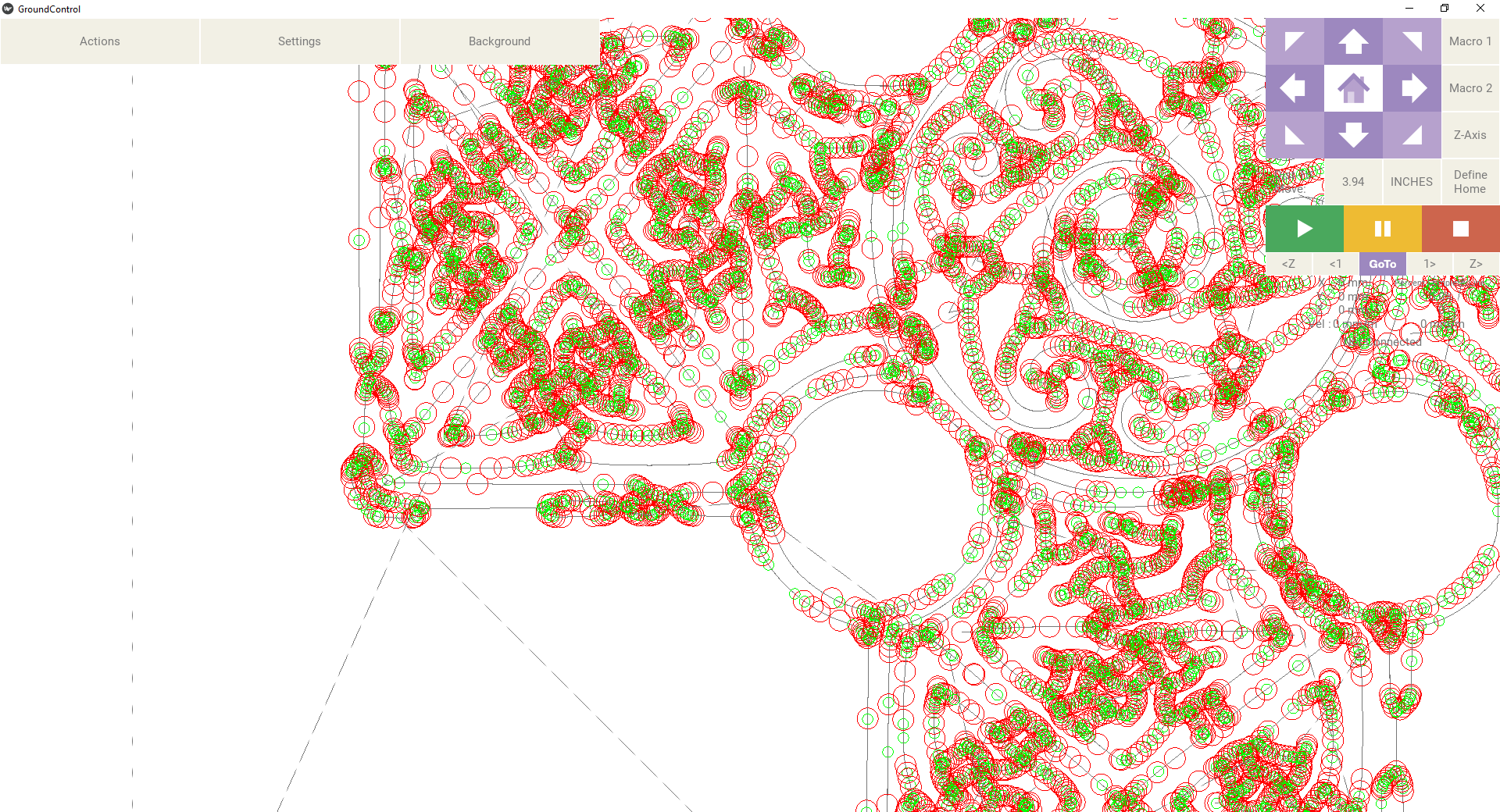
Then, since I’m learning and experimenting, I figured, do a complex one of a celtic cross with lots of knot work, but now it is super slow, after several hours it is only up to 6%. Here is the path (or a bit of it) in Ground Control:
GCode looks like this:
G90
G20
G17 G64 P0.001 M3 S3000
F5.00
G0 Z0.2500
G0 X5.7170 Y12.7274
G1 Z-0.0000
G1 X5.7170 Y12.7274 Z-0.0000
G1 X5.7325 Y12.7030 Z-0.0270
G1 X5.7822 Y12.7107 Z-0.0278
G1 X5.8219 Y12.7136 Z-0.0285
G1 X5.8515 Y12.7129 Z-0.0306
G1 X5.8716 Y12.7077 Z-0.0361
G1 X5.8919 Y12.6966 Z-0.0474
G1 X5.9122 Y12.6796 Z-0.0647
G1 X5.9326 Y12.6567 Z-0.0878
G1 X5.9530 Y12.6279 Z-0.1169
G1 X5.9632 Y12.6214 Z-0.1235
G1 X6.0536 Y12.6214 Z-0.1247
G1 X6.1514 Y12.6189 Z-0.1277
G1 X6.1819 Y12.6377 Z-0.1086
G1 X6.2124 Y12.6512 Z-0.0948
G1 X6.2429 Y12.6593 Z-0.0863
G1 X6.2733 Y12.6621 Z-0.0832
G1 X6.5250 Y12.6599 Z-0.0827
G1 X7.0679 Y12.6469 Z-0.0818
G1 X7.4737 Y12.6401 Z-0.0791
G1 X7.9053 Y12.6357 Z-0.0767
G1 X8.2582 Y12.6339 Z-0.0743
G1 X8.9819 Y12.6329 Z-0.0718
G1 X9.2050 Y12.6292 Z-0.0745…
As you can see, it’s extremely detailed.
Any suggestions of what I might have done wrong?
---
### Author:  [@Gero](https://forums.maslowcnc.com/u/Gero)
#### Post date: [January 21, 2019, 9:01am UTC](https://forums.maslowcnc.com/t/v-carve-super-slow-and-too-detailed/8555/2 "2019-01-21T09:01:49Z")
Are you using the original z-motor with the Rigid router? The large amount of z-moves is what is slowing thigs down. Without and hardware upgrade there is hardly a chance to speed Z up. Nice work though.
Edit: Around 15000 lines of g-code GC might crash due to an assumed memory limit in rendering to many z-moves on the screen. Reference: [Random jumps down when running gcode](https://forums.maslowcnc.com/t/random-jumps-down-when-running-gcode/1564/17?u=gero)
---
### Author:  [@Andy\_Fencer](https://forums.maslowcnc.com/u/Andy_Fencer)
#### Post date: [January 21, 2019, 10:17pm UTC](https://forums.maslowcnc.com/t/v-carve-super-slow-and-too-detailed/8555/3 "2019-01-21T22:17:45Z")
Thanks for your reply - yes, it’s the original Z-Axis with Rigid router.
I guess going forward I’ll have to check amount of detail and speed before starting a cut.
---
### Author:  [@Keith](https://forums.maslowcnc.com/u/Keith)
#### Post date: [February 12, 2019, 9:34pm UTC](https://forums.maslowcnc.com/t/v-carve-super-slow-and-too-detailed/8555/4 "2019-02-12T21:34:31Z")
Have you made any more v-carvings with F-engrave? I am hoping to try my first tonight or tomorrow (a surprise valentine’s gift for the wife).
How big is that bridge carving. My quick calculations for a 6x6 inch carving with some fine script suggested that I’d need to use at most a 30 degree bit to get enough depth to make it visible. I plan to also try with at 60 degree bit first (the 30 degree is due to arrive tomorrow), so we’ll see how it goes.
Also, what firmware and GC version were/are you using?
---
### Author:  [@Andy\_Fencer](https://forums.maslowcnc.com/u/Andy_Fencer)
#### Post date: [February 14, 2019, 4:28am UTC](https://forums.maslowcnc.com/t/v-carve-super-slow-and-too-detailed/8555/5 "2019-02-14T04:28:34Z")
The City is about 12" x 18" with a 90deg. bit. It carved pretty deep in places. F engrave will tell you depth based on the geometry of the bit, unless you restrict it further. I.e. 6mm max depth for a 90deg 12mm bit.
That depth is enough visually, even is you paint and sand it.
After the experience with the cross I changed to estl cam, which works well, but it takes more prep.
I’m giving F-Engrave another try tomorrow, because it is so simple. But I’ll import the g code and simulate it first to get an idea how slow it’ll be.
Good luck with the vday present!
---
### Author:  [@Keith](https://forums.maslowcnc.com/u/Keith)
#### Post date: [February 14, 2019, 3:20pm UTC](https://forums.maslowcnc.com/t/v-carve-super-slow-and-too-detailed/8555/6 "2019-02-14T15:20:31Z")
Thanks for that info!
The vday gift didn’t come out as well as I had hoped, but considering I had to whip it up this morning before my wife woke up (thanks to work, life, and delay in delivery of v-bits), I suppose it’s ok (and she likes it). I am definitely planning to cut it again with hardwood and after testing out different angles of v-cutters.
[ ](https://photos.app.goo.gl/cAk927ctiaSxAXkr6)
It appears that the workpiece was not flat relative to the sled (there were some issues that will be corrected when I have time) as the bottom right is cut too deep and the upper left too shallow.
This one was done with a 60 degree cutter, the overall size being about 6.5 x 6 inches and took just under 30 minutes to cut. CAM was provided by F-Engrave (first use of the program), which I was rather impressed by. It is pretty much a uni-tasker program, but seems to do that task very well. I was rather pleased with my z-axis during the cut, with coordinated moves happening without slowing the x-y movement. I will have to get a video.
I also rushed the painting and sanding, but I do like the kind of rustic look that not sanding off all the surface paint produced. And I didn’t clean out the cuts (as I told my wife, this is a prototype placeholder for a real finished product 😉 ). The sled stuck in a LOT of places. I am hopeful that sticking will be mostly eliminated once I attach the hdpe plates. Hopefully this weekend will allow time to not only finish installing my E-stop and auto-zero, but also cut and install those HDPE plates. Yay for long weekends!
[ ](https://photos.app.goo.gl/o6TJdho2xc6EKfHK8)
(sorry for the poor quality, just wanted to illustrate the c-channel z-axis)
I am still on FW/GC 1.06, so I look forward to any improvements that further versions will give.
---
### Author:  [@mrgnstrn](https://forums.maslowcnc.com/u/mrgnstrn)
#### Post date: [October 29, 2020, 1:27am UTC](https://forums.maslowcnc.com/t/v-carve-super-slow-and-too-detailed/8555/7 "2020-10-29T01:27:42Z")
I’m pretty late to this discussion but I’ve really liked f-engrave.
I also really liked the engrave function in F360.
F360 does a much better job of minimizing z axis movement.
F-engrave has a very intuitive way to limit how deep the engraving is and how to use a straight but to clean out large areas.
Unless someone can point me to the way to get F360 to similarly calculate clean out area.
M