This is something I’ve been meaning to write, but personal circumstances have limited my time recently, and I’m a bit wary of suggesting things I don’t have the time to actively help implement, but it feels very relevant given the other recent discussions, so I’ll just type it out and it can be a bit unpolished.
Maslow as a project, to me, has hit a point (successful) software always hits, where the volume of commits increases, and you get classic issues around scaling. The way these are solved in production software engineering is pretty well established. Interestingly, AI (ignoring the hype) doesn’t actually change any of them - if anything it just shifts-left the point projects hit this as the volume of commits balloons. A time pretty much always comes where you have to sit down and come up with a strategy, and it’s been shown time and again there are three pillars to it actually working.
So, you have three pillars - A Branching Strategy, a Release Strategy, and a Testing Strategy, and they are heavily interconnected. It can be a bit hard to define each without the other, but I’ll just put it out and hope it makes sense.
Why?
There is one underlying premise that this is all based on, that has held true…..forever:
- Any commit invalidates all previous testing.
Ok, that’s a very strong statement, but as a rule of thumb, it holds - neither experienced engineers or AI can predict all the unexpected consequences, and untested commits - if they do anything useful - will most likely have at least a small unintended consequence, change a corner case or introduce a regression.
So what does that lead to with our strategies?
Branching Strategy
This is about maintaining development velocity but keeping stability.
Instead of having just main and everything happening there and releases just being points on main, it’s normal to have multiple branches of your software.
Key Points:
- You have release branches, dev/preview branches and possibly LTS branches.
- Dev/preview is often main - it’s where the development happens.
- You branch main / dev at the point you want to prepare a stable release for public consumption.
- There are a few approaches around the timing of branch creation, that are a judgement based on your Release Strategy - how early or late in the release cycle to create it, generally based on how complex your software is and how long it takes to stabilise vs your release cadence.
- The fundamental point though, is - Release Branches Only Get Bug Fixes.
What we have at the moment is bug fixes and feature development going into the same branch and same releases, and it’s killing us in terms of stability.
Release Strategy
This is about giving the user what they want and maintaining stability.
Instead of every feature being added as soon as possible, you pick and choose and release as often as you can maintain stability.
Key Points:
- Some users want the latest and greatest and will trade stability, most want no bugs at the trade of latest features.
- It’s easy to assume that every feature should go in asap, but every feature costs you in terms of dev, testing and bug fixes.
- You generally balance those by picking the features you want in a release, developing them, stabilising the branch that contains all of the that, releasing it, and then only putting bug fixes in from then on out.
- New features / untested features can be great, but the place for them is a preview / dev branch (and on a small project, that would often just be main) - that can have nightly releases, it isn’t about slowing development velocity.
- The cadence that you branch and release is entirely project dependent - from hours to days to months, it just depends on your circumstances.
- The fundamental point is - The Current Release should always be Stable. The first place a user is pointed should be that stable release.
What we have at the moment is release from main and always point the user to the latest release which means lots of grumpy users who can’t pick stability.
Testing strategy
This is about how you verify your software does what you expect, consistently - and not chasing your own tail with bug fixes constantly. It is how you verify that your current release is always stable.
Every feature should have a test, and ideally everything is tested (though realistically that’s something you strive for but never actually get to).
Key Points:
- Really the key point is what I put above - any commit invalidates all previous testing.
- In practical terms, you can focus testing more around the specific area a commit changes and do Smoke Tests to trim the testing to manageable levels though.
- Normally, testing looks like Smoke Tests (<5 mins automated testing and dev can usually run locally or poke easily), Functional Tests / post-checkin tests (tries to cover everything, dev might be able to run locally, but often is dedicated testing remote hardware) and System Level / Soak / Release testing (testing that’s expensive and/or manual, but you only run when you’re preparing to release a branch).
- I have a few thoughts on how we might kickstart some testing (that i’ll add below), but I also know I don’t know what we currently do for testing so it might already be underway.
- The fundamental point is - Without Good Test Coverage, your Tree is Permanently Broken. You need to be able to run automated testing that gives you high confidence a particular checkin doesn’t break the tree, or all your dev time is lost to chasing your own tail with bug fixes. Sustainable velocity is defined by testing.
What we have at the moment appears to be adhoc, but I also don’t really know if I’m honest.
What could it look like?
So, in practical terms, what might we have chosen to do? I think I would have considered:
- Branch at 1.07, call it the 1.X LTS release, and leave it available to have 1.07.X bug fixes if we want.
- 1.07 was / is pretty stable, and has value as the last pre-individual-arm-kinematics release. I’ll be honest, I’m still using it on one of my boards as it’s predictable.
- 1.13 / 1.14 / 1.15 possibly should have been branched at 1.13 as a 2.0 release, and then been stabilised before release as 2.0, with 2.0.X bug fix releases.
- I would argue the kinematics change, and the anchor point finding changes, should have been in separate releases as the headline features.
- That doesn’t stop there being dev / preview nightly builds with both in, it just shouldn’t be what most users found first.
- 1.15 possibly should have (could be) branched as a 2.1 release, with 2.1.X bug fix releases.
Testing thoughts.
Possibly this should go in another thread, but this is just my thoughts without much familiarity.
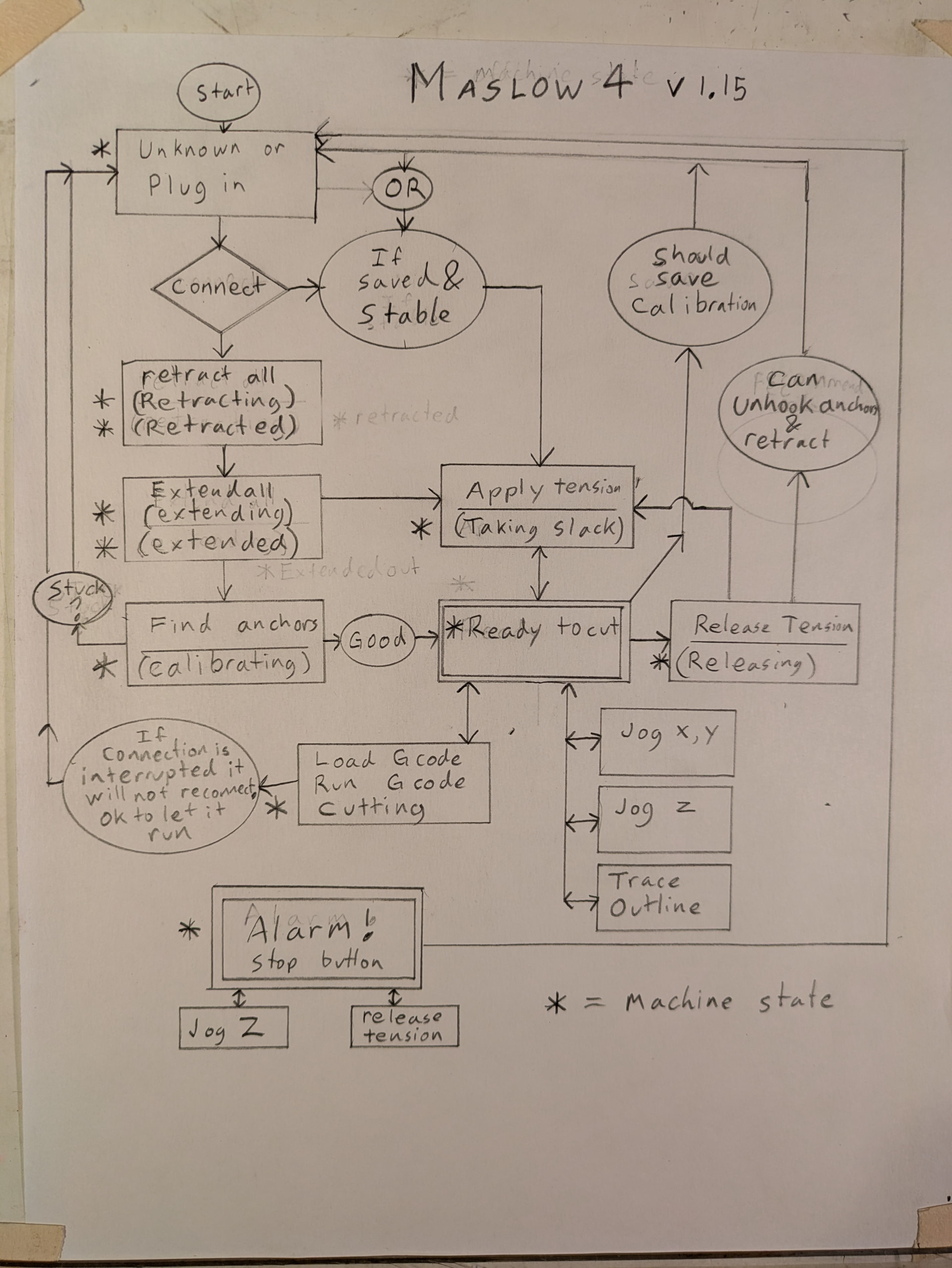
As we’re a state machine - do we anywhere have a state-transition diagram? Do we have tests derived from that?
What we could do is go a step further into something I’ve not seen talked about widely but have seen in person - a state-transition matrix approach.
In essence, you just do a table with the different states the hardware can be in as the rows, and then each column is a Thing - an input, an event, everything you can think of. Then the table entry is the expected outcome, and building out your testing becomes a case of bingo / ticking each off as you create a test for them. It also forces you when adding a feature to look at what the expected behaviours are / be disciplined about what you add. Realistically it only works if you have a small number of states (and really state-transition diagrams are just sparse matrices of these) - but it feels like Maslow is about the right scale for it to work well.