I’d have few concerns… first, the openings of the ones I’ve seen are rather large… maybe 1-inch and that might be hard to get into the view of the camera consistently. the second concern is that the fact that the vertical slats are raised (placed on top of the horizontal slats) that it might cause shadowing and result in image recognition problems. final concern is whether the wood grain would interfere with the recognition as well.
Could you measure the locations of the corners of the empty holes, ignoring the plastic slats? They would give you angle from horizontal and x and y locations from the edges that meet at the corner.
The routine does image processing by converting the image to gray scale, blurring it, doing edge detection, dilating the edges and then dissolving the edges so you get contiguous lines. If an edge is really a shadow, it might or might not pick up on the hard edge. also, if the camera is off center, the hard edge will be shifted because it’s elevated in the Z plane. The concern about the wood grain is whether or not it would be detected as an edge. I think with a big enough square, that won’t be a concern because I use the largest contour found.
They are pretty flat i had my hands on one earlier
The squares are ~1.5" I think. Could you move the camera further away to capture the bigger squares
oh, the one’s ive seen have a 3-d quality to it where verticals are laid on top of horizontals to make it look more like wood slats. In our case, the lower the quality, the better… as long as the openings are consistently the same size.
first get it working, then figure out how to do it cheaply
David Lang
1 Like
My laser cut camera mount pieces arrived from Ponoku today. Boy, laser cut mdf sticks. They did a good job and it slides into the router housing very nicely. Will stop by store tomorrow to pick up a set of 1/4-inch bolts, washers, and nuts to assemble the thing and will start working on the 3D-printed camera bushing

4 Likes
When you get around to it, take a look at the findCenter branch… I’ve reworked the gui some (rearranged buttons, made the presets into a spinner) and added a section to do a curve fit to a quadratic equation. It prints the coefficients on the screen and then uses them in the grid display to show what the equation would produce. Without full sheet data, I don’t think it will do a very good job of curve fitting because of the discontinuities… but we’ll see this weekend what a full sheet looks like.
The firmware also saves the matrix to eeprom but if the curve fit model works well enough, then we won’t need anything special but adding maybe 12 new variables to the settings (6 coefficients per error axis).
I like the idea of using a curve fit formula as it will smooth out the calibration matrix which I hope will improve its accuracy even more.
1 Like
I’ll give it a try, likely tomorrow or Friday!
Very cool, I’m excited to try this! I also really like the idea of the curve fit formula to smooth out the calibration matrix. One of the questions/worries I’ve had is whether a single wonky calibration reading would cause cuts that were not straight.
How confident do you feel in the extrapolation provided by the curve fitting? Do you think It would do well enough that I can simply center my 36"x96" calibration pattern on the work area and rely on extrapolation for the other 12" of vertical space? Do the current matrix-based extrapolation values extrapolate from the outermost two layers of points.
Would it be helpful if I added a UI to add the correction values based on the measured dimensions of the calibration pattern?
You can do two runs, one up top and one down below and it will add the results together. But if you were doing just one run, I would put it lower, rather than in the middle. The lower you go, the more error you will have and having good values there I think would help more than having good values up above.
I forgot to mention I did that as well. That’s part of the reason I changed the presets to a spinner… needed gui space.

I hope its your camera making those squares look all janky!
I used a phone app to reduce the image size (rather than upload a 5 megapixel image) and it apparently makes things janky 
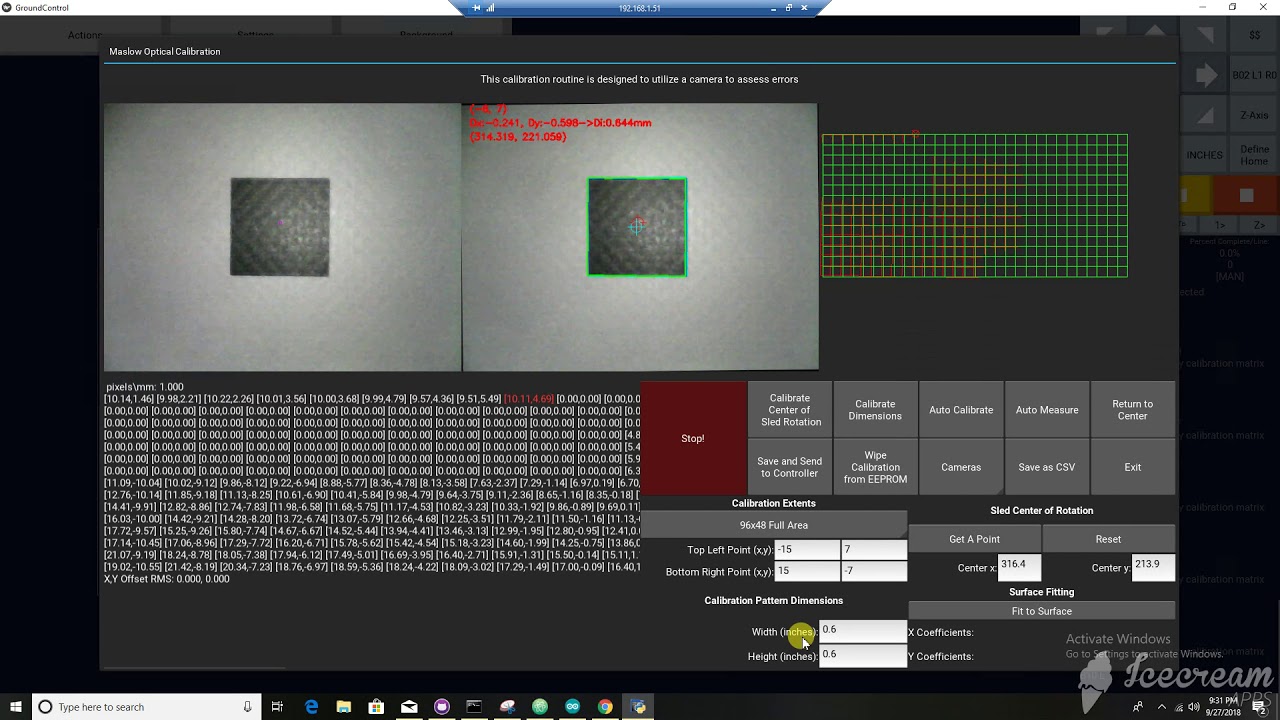
Here’s a video of the latest calibration routine running through the full test… it’s only the first few scans across the board (the software I have stops at 5 minutes). But if you’ve seen one square calibrated, you’ve seen 465 squares calibrated…
4 Likes
Exciting! How was the dimensional accuracy of the banner?
Good advice, maybe I’ll start with just the bottom before I try to get fancy about patching together a version to cover the whole board (or trying to perfectly reposition what I have for multiple runs).
I’ll be able to try out your branch tomorrow, and maybe draw out some designs with my pencil collet to check the dimensional accuracy after everything’s calibrated. Anything in particular it’d be helpful to watch out for when I test?
How long did calibration for the whole board take?
About 2 hours.
I haven’t checked the dimensional accuracy yet, but at least it looks good. The banner looks well done.
2 Likes
Make sure you frame is designed so your sled can actually move to the extents. I had to repeat the test a couple of times. First, a screw I installed up top to hang the sled on interferred with the sled moving across the top. That wasn’t too bad since it starts up top. The second time it had made it more than halfway through and I found my “wing” that the over-the-top chain slack system I have was too close to the work area (long story) and interferred with the sled.
1 Like
I’ve uploaded the calibration data to the maslowtestdata repo:
Interesting result is that there’s periodicity in the data and my hypothesis is that it’s related to the direction of scanning. I’m suspecting that going from left to right might produce different results than going from right to left. This might indicate there’s something wrong with one of my motors (something loose in the gears). I’m going to check them tonight. I bought two spare motors in the event something like this happened. If there is a problem, it’s nice to know there’s a way to figure it out. If there is not a problem, then we need to figure out why there is periodicity when there shouldn’t be.
2 Likes
A few questions about the numbers matrix.
- What are the coordinates of the values as we read them
left to right, ie x=1", 4", 7"…
top to bottom. y= 1", …
-
Which matrix are x deltas, and which are y deltas?
-
All of the numbers are positive. Does that mean it is always off to one corner, ie. up and left?
-
What are the values? mm. “, .001”, ?
Top set is X error and bottom set is Y error, both expressed in mm.
Top left value is the reading from the top left of the board and bottom right value is reading from bottom right of the board… so looking at it, it aligns with the board.
Each reading is 3-inches on center with the first reading three inches from the top and left. So there are a total of 31 readings horizontally, with the center “column” being at reading 15 and 15 readings vertical with the center “row” being at reading 7, so the center of the board(0,0) is reading 15,7 in each matrix.
The coordinate space Maslow uses is that values increase from left to right and decrease from top to bottom. If, for example, the controller was trying to get to -100 mm, +100 mm and the x,y error was 5 mm, 6 mm, the controller would calculate the chain lengths needed to go to -95 mm, 106 mm. However, the calculation is made a little different than just taking the value from the matrix.
The routine actually uses the center reading to modify the location of the motors so that there is no correction needed at the center point. Here, the Xerror at 15,7 in the data is 12.95 mm and the Yerror is 5.45. The firmware uses these values and shifts the position of both motors to the left by 12.95 mm and down by 5.45 mm. This causes the controller to redetermine it’s coordinates and when you issue a Move to Center command, it goes to 0,0. Then, when the controller receives a command to move to a certain set of x,y coordinates, it adds the associated Xerror and Yerror from the calibration matrix and subtracts the center’s Xerror and Yerror. I did this because when I didn’t do it that way, everytime I tried to make a move after setting the calibration, I got “sled not keeping up error” and it stopped working. By readjusting the motors for the center position, the problem went away. Why? I’m not entirely sure, but that’s how it works.
And to further explain why I say this… the sled moves in horizontal sweeps. It starts from left to right, then drops down to the next row and then sweeps right to left… which it then drops down and repeats the cycle. If for example, something was loose in the gear box (or even the set screw on the sprocket is loose) then as it shifts from going from left to right to right to left, that looseness will be taken up and you’d get a different set of readings than if you went the same direction each time.