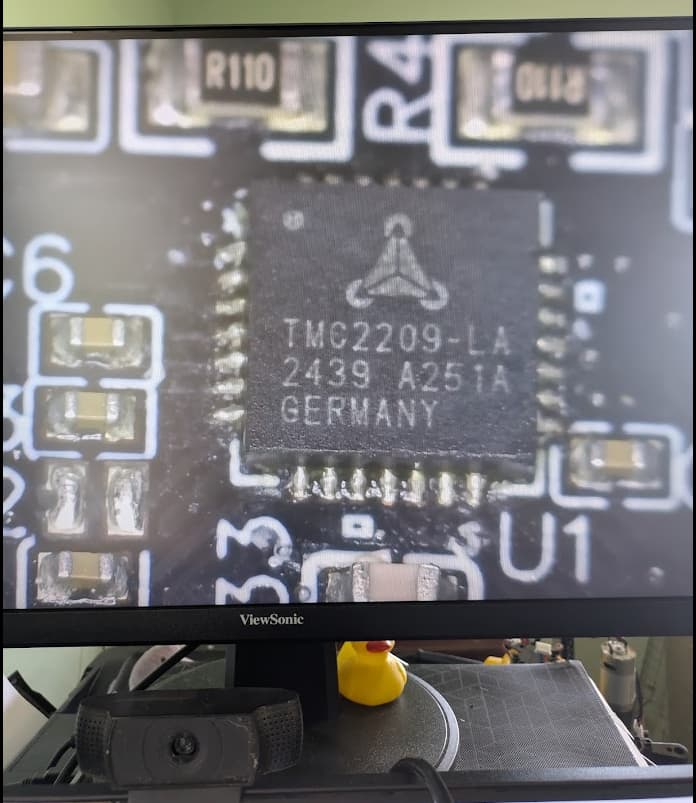
So i reflowed the solder on those two IC for the z axis, quite roughly tbh, with a soldering iron and so far it seems to have worked, both z axis motors moving up and down no dramas with manual jog
2 Likes
I’ve lost track of who in this thread I’ve sent codes to for free boards and who I haven’t 
@Deadset did you pay for your board? If so what is your order number (I’ll refund it)
Is anyone else seeing this issue and hasn’t gotten a code yet?
It sounds to me like this is unfortunately a soldering issue not software so the only solution is to reflow the chip or get a new board. I’m happy to send anyone who needs one a new one ASAP.
I’m talking with the factory to figure out what went wrong and how these weren’t caught in testing.
1 Like
Hey @Bar - I haven’t got a code yet, would love to get this up and running. Cheers
Nah you sent me a code, all good!
1 Like
Just a quick shoutout for @bar’s approach to support. +1!
1 Like
I’ll definitely +1 this. Thanks for your support @bar !
1 Like
Can I get a code too please? After assembling my unit and upgrading it from 0.87 to 1.07 I started playing with extending and retracting the belts and after all that seemed to work I tried to move the Z-axis but nothing happened. After finding this tread last night, this morning I took the PCB to my ‘lab’ and after removing the heat sinks and cleaning the dried compound from the two drivers you indicated, I was able to reflow them. And now the Z-axis steppers work as they should. Yeah!
I was not able to reattach the heat sinks because I don’t have a compound that dries like an adhesive, but I figure those drivers don’t get all that hot because of their low duty cycle.
That said, I would appreciate a proper unit in case my handwork proves less than robust.
Dave
1 Like
Same problem here. Fans spin up, but no movement up or down 
I was hoping to do some testing this weekend but I guess it’ll have to wait. Could you please send me a code as well? My order no is #11550
1 Like
@bar Z-axis problem here as well. Only one port on the controller working (moved the non working sides motor the other connector). Need code please.
1 Like
No movement at all could be an issue with the Maslow.yaml file. That is often the culprit if it’s both motors not working. I’ll send you a code anyway, but maybe check that file and see if replacing it fixes the issue. You might need to restart twice for the issue to go away.
1 Like
Hi bar
Thanks for your reply and the code. I tried the latest yaml file before my previous post, it had no effect. I’ve ordered the new board. Thanks for your help!
1 Like
Hi bar,
I also have an identical issue to this, via order #1091. Should I just order a new board? I’m using the yaml file included with firmware 1.06
edit:
I just noticed that you’re going camping, so I ordered the replacement board on the shop. I’m also going camping in a place without network in a week too, so I understand the likely slow replies.
1 Like
Excellent! I will refund it as soon as it ships! (sometimes if I refund it before it ships it confuses the warehouse)
Hi, also the same problem, one z-motor does not move. both motors work fine after swapping them in the sockets. Could I please have the code for the new board?
1 Like
Hi @bar,
I also seem to have one port that does not work on my board. After “no z-axis movement at all” I updated maslow.yaml to the latest version and it worked! That was excellent, a moment of  ! I switched off my Maslow and when I switched it back on the next day to start initial procedures, 1 z-axis did not work! Ai ai ai. I read a bit on the forum about it and I switched the cables and sure enough, the other Z-axis did not move. Then I left my Maslow on for a long while, long enough for it to heat up and … yes, both motors worked! It seems to be a common problem. I read about reflowing but I have no experience with that. Is there anything else I can do? I have a good soldering iron and experience soldering (simple) electronics. Or maybe someone can tip me on how to reflow the one z-axis controller-chip?
Oh, I see there’s a heatsink on top of the two chips.
Any advice is appreciated!
Kind regards,
Huib.
1 Like
Yeah, the solder connection isn’t reliable so sometimes it will work and then sometimes it won’t 
The most solid way to fix it is for me to send you a new board. I’ll DM you a code right now.
@bar I seem to have the same issue. After starting up the Maslow the stepper motors 8 out of 10 times won’t work/get initiated. The board fan starts spinning and the UI “jogs”. I thought this was a software issue but using any +1.03 version I still get the same issue. I ordered my Maslow in the latest Kickstarter campaign and recieved it may. In based in the Netherlands.
Lasse wrote:
@bar I seem to have the same issue. After starting up the Maslow the stepper
motors 8 out of 10 times won’t work/get initiated. The board fan starts
spinning and the UI “jogs”. I thought this was a software issue but using any
+1.03 version I still get the same issue. I ordered my Maslow in the latest
Kickstarter campaign and recieved it may. In based in the Netherlands.
did you try loosening the bolts to the steppers and then running the sled all
the way down? there is just enough play in the bolts that it’s possible to
misalign them enough to cause grief.
David Lang
Hay @dlang,
Thanks for your response. By running the sled all the way down do you mean leveling out the position of z axis all the way down till it won’t go further? The issue i’m experiencing is not really consistent, but I’ve several times been able to calibrate the machine with then z axis all the way down (using no bit of collet in the router).
This sounds like the batch of boards that had the issue, I will DM you a code for a free replacement right now.
1 Like