And No I couldn’t see the version number under the parallel lines
Works as expected except still have a problem with Z value as displayed in attached. Goes wildly negative after power reset.
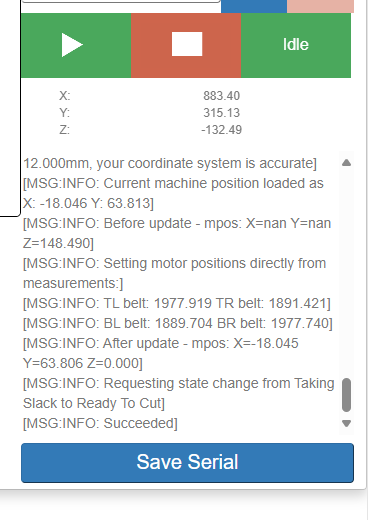
Going to and from release tension works well. Have not tried a calibration.
1 Like
This is super interesting, I just gave it a try and I’m not able to replicate that.
It happens every time that you power cycle?
What happens if you press the “set z-home” button?
Not every time and it is not always negative when it happens. Doesn’t always happen, I am trying to identify what precedes it failing. Pressing home Z sets it as expected. I hate intermittent faults.
1 Like
Had a problem with Maslow stopping after starting a job. Had it doing an engrave (with a pencil lead). I then Released Tension, checked the drawing (all OK), Re-tensioned, I also noticed an Error 66. Moved to another spot, rest the home to repeat drawing and the Maslow stopped halfway through the 2nd attempt and would not accept commands from the browser.
Attached is the Console.log (not maslow log) and the file I was attempting to run. A third attempt after restarting the web page failed almost immediately after starting. It then reported the yaml file was corrupt. I power rebooted the Maslow, released Tension and retracted belts.
maslow.local-1757052059846.log (92.0 KB)
EngraveKoala.nc (194.7 KB)
This with V1.10.1
1 Like
Truly. They are infinitely harder to debug 
I think that I saw this the other day too. I also saw something strange (and maybe related) yesterday where mid way through cutting a job it stopped, the fan turned off…and then it started up again and kept cutting after about 1 second.
I’m thinking about trying to get back in sync with the main branch of FluidNC because this feels like something deep in the FluidNC code that they may have fixed on their main branch and the main branch now supports ESP32-S3 I believe which is great.
That’s going to be a pretty big project tho.
Have they added the needed chip support yet? If not, it may be best to start
with that so that the kinematics and DC/encoder support can be handled
separately
also ask if they have support for cable driven robots.
David Lang
1 Like
I believe that they do have S3 support now, but I’ll need to double check that
Bar wrote:
I believe that they do have S3 support now, but I¢ll need to double check that
If they do, I would suggest using copilot to refactor maslow support in the
following ways
-
create a motor driver module that supports DC/encoder motors instead of
steppers in a way that’s transparent to the movement logic (this will mean that
the DC motors and encoders will be defined in the .yaml file, not in the code).
This will change a lot of the maslow code from four functions of each type (one
for each motor) to one function that takes the motor id as a parameter (I
haven’t checked the code recently to see if you’ve done this already) -
create a cable-driven-robot kinematics module that accepts an arbitrary
number of anchors/motors. This will include belt movement commands (which should
be changed from ‘retracttl/retracttr’ type to ‘retract tl tr’ type to handle an
arbitrary number of motors)
once these are done, the remaining maslow specific parts should be rather small,
(mostly ‘find anchors’ aka calibration types of things, although much of that
may end up being moved into the client
David Lang
I think I have found when it happens. (unexpected change in Z value)
I powered on the Maslow, unlocked and adjusted the Z access to set home zero.
I then retracted and extended the belts, all with a value of +4 on the Z access
When I took tension the home position for the z access jumped to +13, which was where it probably was when I powered down last night. I suspect the saved variable is not being updated properly before
It hadn’t moved the Z axis, so I was able lo lower it 4mm and reset the Home position for the Z axis, then raise and continue.
2 Likes
see previous
Is V1.11 the same as V1.10.1?
Ian Abbott wrote:
Is V1.11 the same as V1.10.1?
no there is more in 1.11
1 Like
There is a little bit more in 1.11, but nothing that would impact this z-loading issue.
Thank you for the excellent description! I will try to replicate it!
This is perfect. I’ve been able to replicate it and I will work on getting a fix ASAP.
I’ve always been applying tension before setting the z-home so I hadn’t run into this.
1 Like
I find it difficult to set the Home Z accurately when the Maslow is tensioned, hence the way I have been doing it. The latest way I have been adjusting ’0’ is putting a metal strip flat across the perspex dust cover, bring the bit down to that where I can see it easily, setting the Z to Zero, then removing strip and lowering a known amount which puts the bit on the material and resetting the Z to zero again. Raising it a couple of mm and proceeding from there.
On another note is it possible to reset the X & Y correction offsets without a fluidNC reset? It’s a pain to have to do the full retract extend dance to test changes.
1 Like
Which values are these? Like the anchor point locations?
Or the X and Y scale factors?
Scale Factors
1 Like
I believe that they should become active as soon as you set them, no need to restart
Ian Abbott wrote:
I find it difficult to set the Home Z accurately when the Maslow is tensioned,
hence the way I have been doing it. The latest way I have been adjusting ¢0¢
is putting a metal strip flat across the perspex dust cover, bring the bit
down to that where I can see it easily, setting the Z to Zero, then removing
strip and lowering a known amount which puts the bit on the material and
resetting the Z to zero again. Raising it a couple of mm and proceeding from
there.
yos, touching off against a metal strip should be done before applying tension.
are you aware that you can automate this? by attaching a wire to the metal
strip, and a wire with a clip to the bit, the maslow can detect when they touch.
David Lang
Here is firmware version 1.11.1 (that’s got to be good luck) which includes fixes for the Z-axis issue that @ian_ab found and the issue with running back to back anchor point locations that @dlang found.
Both excellent bugs!
firmware.bin (1.9 MB)
1 Like