What if the setup menu (retract,extend,apply tension,etc) is vertical like a flowchart and if the machine was satisfied in its state then that step is grayed out (not selectable) or after the routine is satisfied. Say if you power up the Maslow and you need to do the dance then that is selectable until performed and satisfied but the find anchor points stays not selectable if it’s had a satisfied routine. Or if you power up and the Maslow finds all routines satisfied then all buttons stay grayed out. To me the pop up for setting the extend distance, retract and calibration tension values could be omitted since it is already listed in the configuration in fluidnc. For me if it’s not an option to select if satisfied then I wouldn’t be inclined to further complicate things by doing unnecessary steps. New user in mind.
EG When Find Anchors is run
Calculated Fitness Too Low (0.2692732 < 0.45). Retry 4/10…
Calibration values:
Fitness: 0.2692732
Maslow_tlX: 11.3 …
 Calibration stopped due to low fitness after maximum retries.
Options:
- Click “Calibrate” to restart with updated frame size estimate
- Manually check belt tension and frame measurements
- Verify measurements are accurate
[MSG:INFO: Calibration state reset]
[MSG:INFO: Requesting state change from Calibration Computing to Belts Extended]
And just my two cents. The setup from finding the correct extend distance, setting retract and calibration tension values to finding anchor points wasn’t a headache. I’d really prefer it to stay that way. Most of the fun in open source builds is being able to set things, change values, fine tune and break things. It’s all a part of it. So in my simple mind I see all the streamlining happening behind the screen actually seems to have complicated things on the user side. A step by step help guide like one I’ve heard mentioned here is a huge benefit to new users. I also feel some of this streamlining is the cart before the horse also, not evolution of the product.
Where this comes from is @Smiley tried to Apply Tension when he did not have a valid Anchors set and had to do the power off restart etc to recover after Failed to compute XY Lengths. This needs to go back to Belts Extended with an advisory to run Find Anchors.
Extract from @Smiley log file:
Extend All
[MSG:INFO: Extending all belts]
[MSG:INFO: Requesting state change from Belts Retracted to Extending Belts]
[MSG:INFO: Succeeded]
[MSG:INFO: All belts extended to 1810.000mm]
[MSG:INFO: Requesting state change from Extending Belts to Belts Extended]
[MSG:INFO: Succeeded]
Apply Tension
[MSG:INFO: Requesting state change from Belts Extended to Taking Slack]
[MSG:INFO: Succeeded]
[MSG:INFO: Measured waypoint 0]
[MSG:INFO: Unable to determine machine position]
[MSG:ERR: Failed to compute XY from lengths]
Ah yeah good catch! Will you make an issue for that?
Align Find Anchors terminology across UI and state machine #755
I think it’s right to go
index.html.gz (131.6 KB)
firmware.bin (1.9 MB)
needs testing, atari-zero and Ian, can you take a look at this?
firmware-package integrated state.zip (1.3 MB)
This test version partially integrates the fluidnc state with the maslow state machine. The purpose is to solve the ‘stuck in home’ problem where the maslow state says it’s ready to cut, but the fluidnc state has it locked.
This should eliminate the need to mess with the home/alarm/idle button
What it is supposed to do is to watch the maslow state changes and change the fluidnc state in a sane manner
what I’ve got so far:
when the machine starts, it doesn’t know where home is, so it can’t do gcode or jog safely, so it starts in the state homing (used to start in state alarm)
maslow state transition any → unknown due to error fluidNC state → alarm
- having an error that takes you to state unknown will put you in state alarm (where you really need to detach/retract/extend/apply tension to recover)
maslow state transition any → ready to cut fluidNC state → idle
- getting it into ready-to-cut will move fluidNC to the state idle
maslow state any → retracted or ready-to-cut → release tension will move fluidnc state → homing
- getting fully retracted, or extending from ready-to-cut will put you in state homing. It may be that there are more transitions that should act like this, but this seemed like a good starting point for flagging states where jog and gocde movement should not be allowed until you finish homing.
one thing I just thought of, but haven’t looked at is what happens to the Z motion when in alarm/homing state, I think it still works, but I’m not sure.
David I ran this from Unknown state right through to Ready to Cut, but I am not sure what I am looking for or what problem you are trying to fix.
I don’t think we need to integrate those. This is a recent bug that I introduced and it should be a one line fix to make sure that we exit the homing state correctly. A big refactor shouldn’t be needed.
This looks fantastic! Great work!
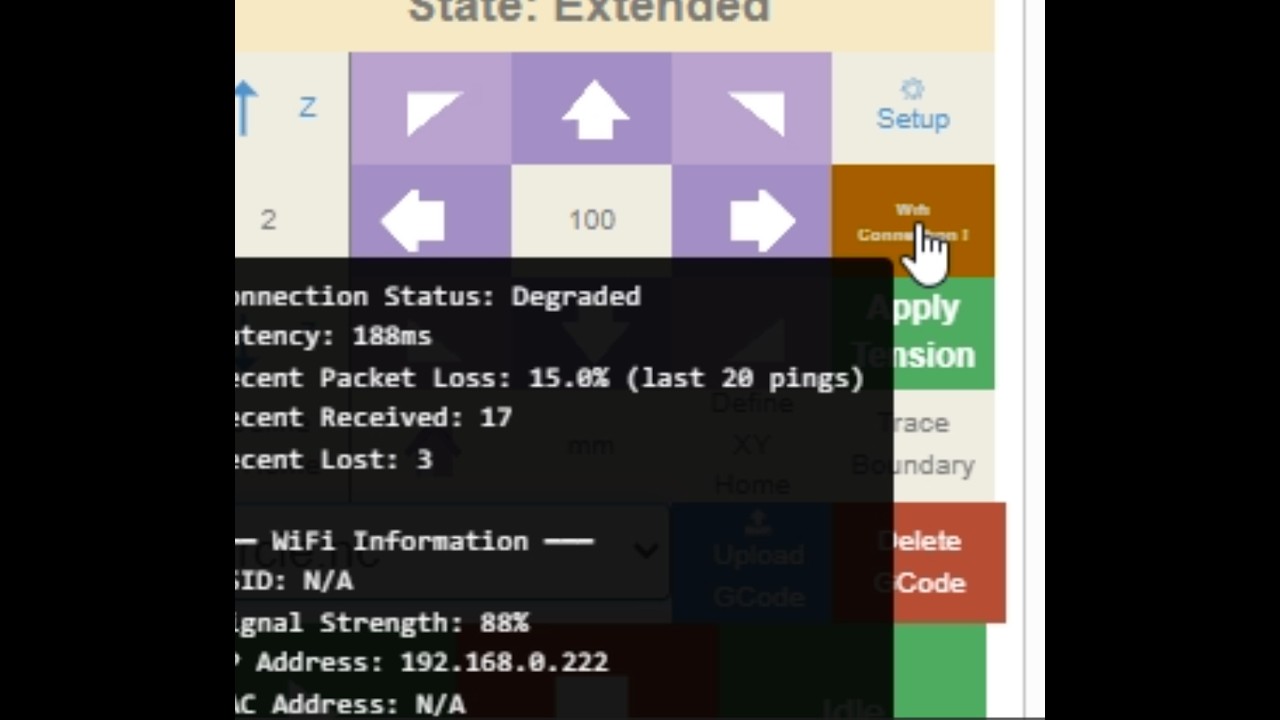
Here is an experiment in adding connection monitoring. It adds a wifi connection status indicator to the main control panel and hovering over it will give more detailed information about the status of the connection:

I’m not totally sold on it and I want to do a lot more testing before merging something like this that runs all the time in the background, but I think that it’s an interesting concept and I’m curious to hear feedback and see what other folks think of it.
In particular what wifi signal strength do yall see? Mine is always 100% so I’m not sure if it’s working right 
@Smiley and @Caleb_Yager if you are still having wifi connection issues would you be willing to give this a try and let me know if it seems like useful information for you?
You will need to update both the firmware and index.html.gz file for it to work:
firmware.bin (1.9 MB)
index.html.gz (133.5 KB)
Bar wrote:
I don¢t think we need to integrate those. This is a recent bug that I
introduced and it should be a one line fix to make sure that we exit the
homing state correctly. A big refactor shouldn¢t be needed.
it’s not a big refactor, only ~30 lines of code/comments see
David Lang
Ian Abbott wrote:
David I ran this from Unknown state right through to Ready to Cut, but I am
not sure what I am looking for or what problem you are trying to fix.
the thing to look for would be the idle/alarm/home button (far right of the
play/pause stop row) should clear by itself and/or change as you go through the
various states I mentioned above
David Lang
Hi @bar loaded this and recorded results, had a couple of dropouts which I wouldn’t have known about otherwise. Just left it running most of the time. Dropped out after 1 min, 2 min and around 3 minutes in video.
Thanks for testing! It’s great to see that the signal strength gauge works 
It’s weird that the connection interruptions seem to happen right on the minute marks, but maybe that is a coincidence, I did see another one at 3:44.
Maybe this would be a helpful helpful for debugging to see if something like a particular cell phone being close by or something would lead to interruptions.
I know with the original Maslow design I found that I had one particular corded drill which would disrupt USB communications…it took a long time of trial and error to figure that one out 
Is that ping coming from the Maslow or the Web page?
Its the web page sending a ping to the Maslow
I opened a 2nd browser to Maslow, ping failed at the same times on both.
Bar,
I’ll give it a shot and see what I can see. With my network issues having the wifi monitor may help me. Maybe it will show me what is happening when I try to connect directly to the Maslow and not through a LAN.
I was able to cut a test piece today, so I am kind of hesitant to change anything. But I will give it a shot and see how it does.
Thank you for your help!
These are the files to reestablish control after disconnection of a browser. It also duplicates status for a secondary browser. Let me know what you think.
index.html.gz (132.1 KB)
firmware.bin (1.9 MB)